
The graphical interface works without AI
An AI assistant is not required for installation or play. The graphical launcher provides environment checks, import, builds and installation. Enable the control interface only when your assistant can run commands locally and you want it to help.
The project provides s2armctl as the control entry point, with actions reflected in the launcher window. This site documents that capability. It does not offer remote control or access your computer, games or keys.
Connect to the launcher and read the next step
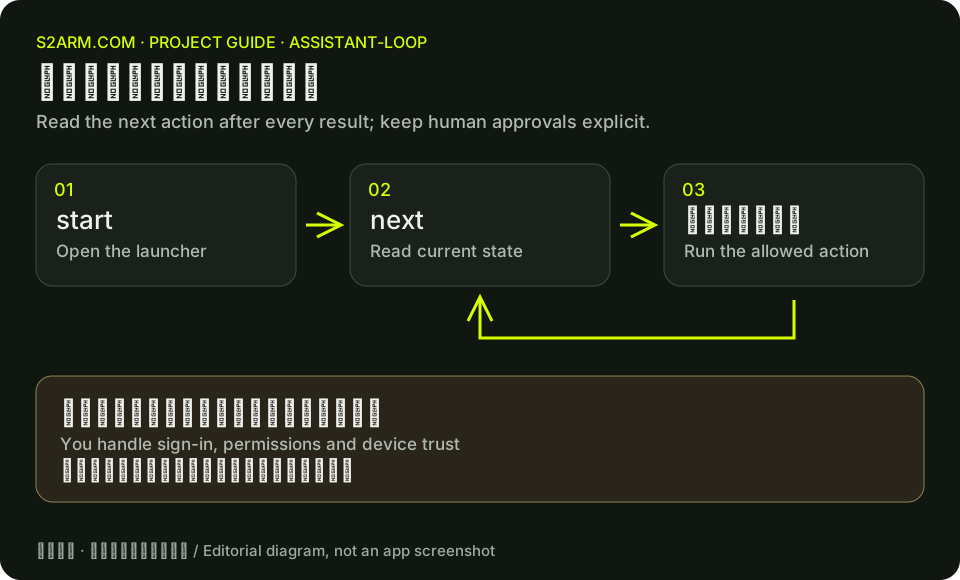
On Mac, use s2armctl inside the app. On Windows, use s2armctl.cmd in the launcher folder. start opens and connects to the launcher; next reports the current stage, proposed action and responsible actor. Read the state before allowing the assistant to proceed.
The example below reads launcher state on Mac. In the Windows launcher folder, use s2armctl.cmd start and s2armctl.cmd next. Available commands can vary by release; follow the installed version and upstream operator guide.
/Applications/S2Arm.app/Contents/Resources/s2armctl start
/Applications/S2Arm.app/Contents/Resources/s2armctl next
Steps that remain yours
System permissions, Apple ID sign-in, two-factor verification, device trust and decisions to delete data remain yours. Do not paste account passwords or key contents into websites or public chats. When an assistant needs a file location, give the path rather than its contents.
Have the assistant read next after each step, especially after an error or a target-game change. Avoid a separate invisible build process that bypasses launcher state, because the window and actual task can then disagree.
Export diagnostics when progress stops
Retain the error code, task stage and log message, then export a diagnostic ZIP as described upstream. Windows diagnostic export appears in the v0.1.1 release notes, superseding older README statements that it was Mac-only.
Review the export before sharing it. Do not attach keys, original games or saves. You decide whether to submit an issue. This site’s report tool can organize reproduction text but does not send it to GitHub.
/Applications/S2Arm.app/Contents/Resources/s2armctl diag export ~/Desktop/S2Arm-diagnostics.zip