
The device used to play
Current release notes list A14 / M1 or newer chips and iOS / iPadOS 18 or later for Apple mobile devices. The Mac play path requires Apple silicon and macOS 15 or later.
These are platform requirements, not a promise that every game works. Memory, game version, package version and graphics features can change the result. Read the device and test scope on the game page instead of relying on a pass label alone.
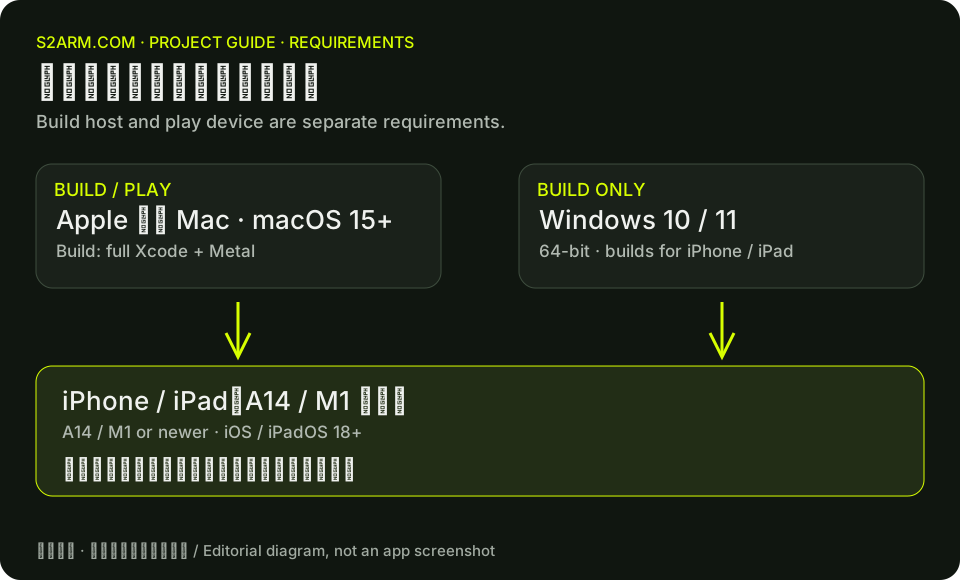
The computer used to build
The Mac launcher targets Apple silicon Macs. Preparing or rebuilding games for macOS or iPhone / iPad needs full Xcode and Metal compiler components; iOS targets also need iOS platform components. Playing an already-prepared Mac game does not require Xcode. Check the Apple ID and signing team separately for the later iPhone installation. Windows requires 64-bit Windows 10 or 11, with iTunes or Apple Devices for device detection during installation.
Windows support refers to the build and installation workflow. It does not mean games run natively on Windows. Android and HarmonyOS remain planned platforms; the current downloads should not be treated as working releases for them.
Storage and file locations
Original files, extracted data, build artifacts and graphics caches use different amounts of storage. Follow the launcher’s check for the selected game rather than applying one fixed multiplier to every title. Retain originals and do not delete saves to make room.
The project’s current operator guide distinguishes original files from the Mac library’s working data. Originals can be on an external drive. If the check reports library_not_apfs, choose a supported APFS location for the working library and check again. Do not format an existing disk just to dismiss that error.
Check the version you actually use
Some beta documents still mention macOS 26 or no Windows support. Later release notes supersede those statements. This guide follows v0.1.0 and subsequent releases. Version 0.1.5 corrected the bundled tools’ minimum macOS version, but the maintainers noted that they had no macOS 15 machine for a physical check.
Updating the launcher does not automatically update existing game packages. To retest a fixed issue, check the launcher version, rebuild as instructed in the release notes and record the new package version.